

Exporting Network Requests as Prompts
Turn captured network traffic into redacted exports and prompt-ready summaries for AI-assisted debugging, performance reviews, and failure analysis.
RocketSim can turn captured network traffic into a format that is much easier to share with AI coding assistants. Instead of pasting raw requests one by one, you can export a filtered request set as a compact summary or generate a built-in prompt tailored to the problem you want to investigate.
Where to find it
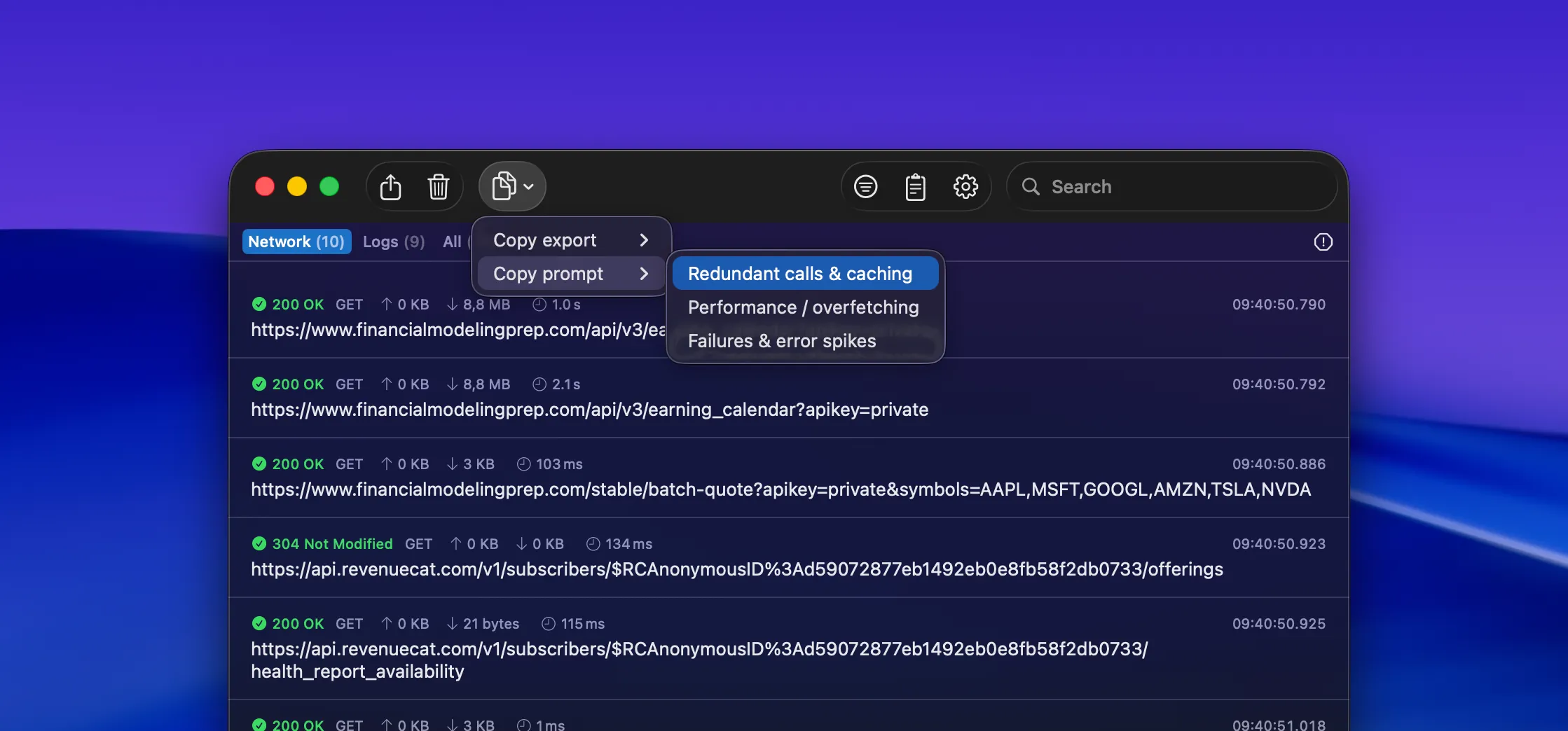
Section titled “Where to find it”Open either Network Traffic Monitoring or Networking Insights, then use the toolbar’s copy menu.
From there, RocketSim gives you two paths:
- Copy export for a compact, redacted summary of the selected request set
- Copy prompt for a ready-made AI prompt based on the currently filtered requests
Copy export options
Section titled “Copy export options”Copy export creates a minimal representation of the filtered traffic so it stays readable and token-efficient when pasted into an AI tool.
You can export:
- Minimal (redacted) for a compact request summary
- Minimal + JSON schema (if any) when you also want a lightweight schema summary of JSON responses
RocketSim intentionally keeps the export lean so you can focus on debugging patterns instead of scrolling through full payload dumps.
Built-in prompt templates
Section titled “Built-in prompt templates”Copy prompt creates a more guided prompt for common network-debugging tasks. RocketSim currently includes:
- Redundant calls & caching to detect duplicate requests, deduplication opportunities, and missing cache strategy
- Performance / overfetching to spot slow endpoints, oversized payloads, and opportunities to trim fields
- Failures & error spikes to focus on non-2xx responses and likely causes such as authentication, validation, rate limits, or backend issues
Because the prompt is built from the current filters, you can narrow the analysis first by app or time range and then copy a much more focused prompt.
Copy Summary for individual requests
Section titled “Copy Summary for individual requests”When you’re inspecting a single request, the context menu also includes Copy Summary. This is useful when you want to share one request with a teammate or paste one request into an AI chat without including the entire session.
Sensitive values such as API keys and bearer tokens are automatically redacted, making it safer to share request summaries.
Suggested workflows
Section titled “Suggested workflows”Debug a spike in failures
Section titled “Debug a spike in failures”- Open Networking Insights
- Filter to the affected app and time range
- Inspect the failure cluster
- Use Copy prompt → Failures & error spikes
- Paste the result into your AI assistant and compare the suggestions with the failing endpoints in RocketSim
Find duplicate or wasteful calls
Section titled “Find duplicate or wasteful calls”- Open Networking Insights or Network Traffic Monitoring
- Filter to the feature or screen you’re working on
- Use Copy prompt → Redundant calls & caching
- Review the AI suggestions for repeated calls, cache hints, and batching opportunities
Share a single request safely
Section titled “Share a single request safely”- Right-click the request
- Choose Copy Summary
- Paste the redacted output into GitHub, Slack, or your AI assistant
This gives you the useful debugging context without exposing raw secrets.