
Check your email to confirm your subscription—don’t forget to check your spam folder too!
RocketSim 17
Your agent walks the app once.
Then it never has to again.
RocketSim Flows save a Simulator path as a few lines of text. Your agent replays it with one command, and you review every run on a live page.
No signup. Works with Xcode 16+ and Xcode 27's Device Hub.
An agent lists saved flows, runs one that signs in first, then replays it. The second run skips the sign-in prerequisite because the app is already signed in. Commands the agent runs: rocketsim flow list; rocketsim flow open-account; rocketsim flow open-account.
Coming soon in RocketSim 17
Be first to know when it ships.
Sign up below to get a first heads up when RocketSim 17 is available.
Save
A path becomes a few lines of text.
rocketsim flow save writes the last steps
to a .rsflow file. It picks the shortest selector for each tap
and adds a checkpoint after every screen change.
# Save the last three steps rocketsim flow save --name login --about "Sign in with the test account" --last 3- 1
Secrets stay out
A secret parameter is never written to the file, a session log, or a failure reply. The flow only stores the placeholder.
- 2
Minimal selectors
Saving picks the shortest selector that finds the element: an identifier when there is one, a label when not.
- 3
Checkpoints
An expect between screen changes catches a wrong turn at the step that caused it, not ten taps later.
- 4
Prerequisites
A flow line before the first step runs another flow first, and is skipped when its final expect already holds.
Replay
One command. Checkpoints on the way.
# What is saved for this app? rocketsim flow list# Replay with a secret from the environment rocketsim flow login --param password=$TEST_PASSWORD# Login is skipped when already signed in rocketsim flow open-settingsPrerequisites skip themselves
A flow can start with another flow. When that flow's final check already holds, RocketSim skips it, so the agent never signs in twice.
One short reply
A run returns a status and a step count. A failure returns the step, the reason, the nearest element, and how to resume.
Heal
When the UI changes, the flow heals.
flow fix rewrites it, and the next run passes.
A saved flow fails because the app renamed the Account tab to Profile. The agent taps the new tab itself, runs flow fix, and the next run passes. Commands the agent runs: rocketsim flow open-account; rocketsim interact tap --label "Profile"; rocketsim flow fix open-account; rocketsim flow open-account.
Review
Every flow, on a page you can point at.
rocketsim flow open serves the flow as a board: each screen once,
arrows from the tapped element to the next. Open it in your IDE's browser, and
comment on what you see.
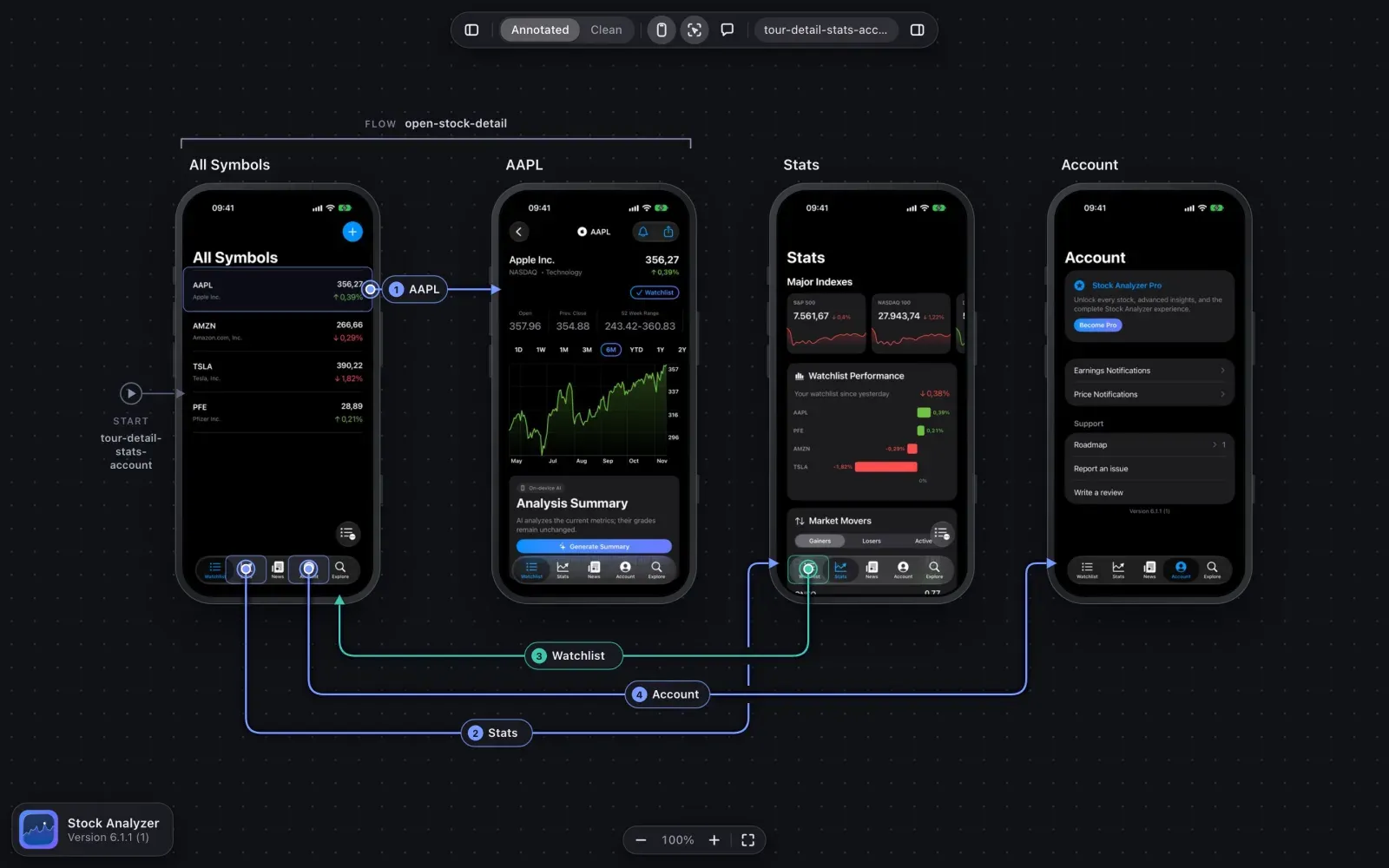
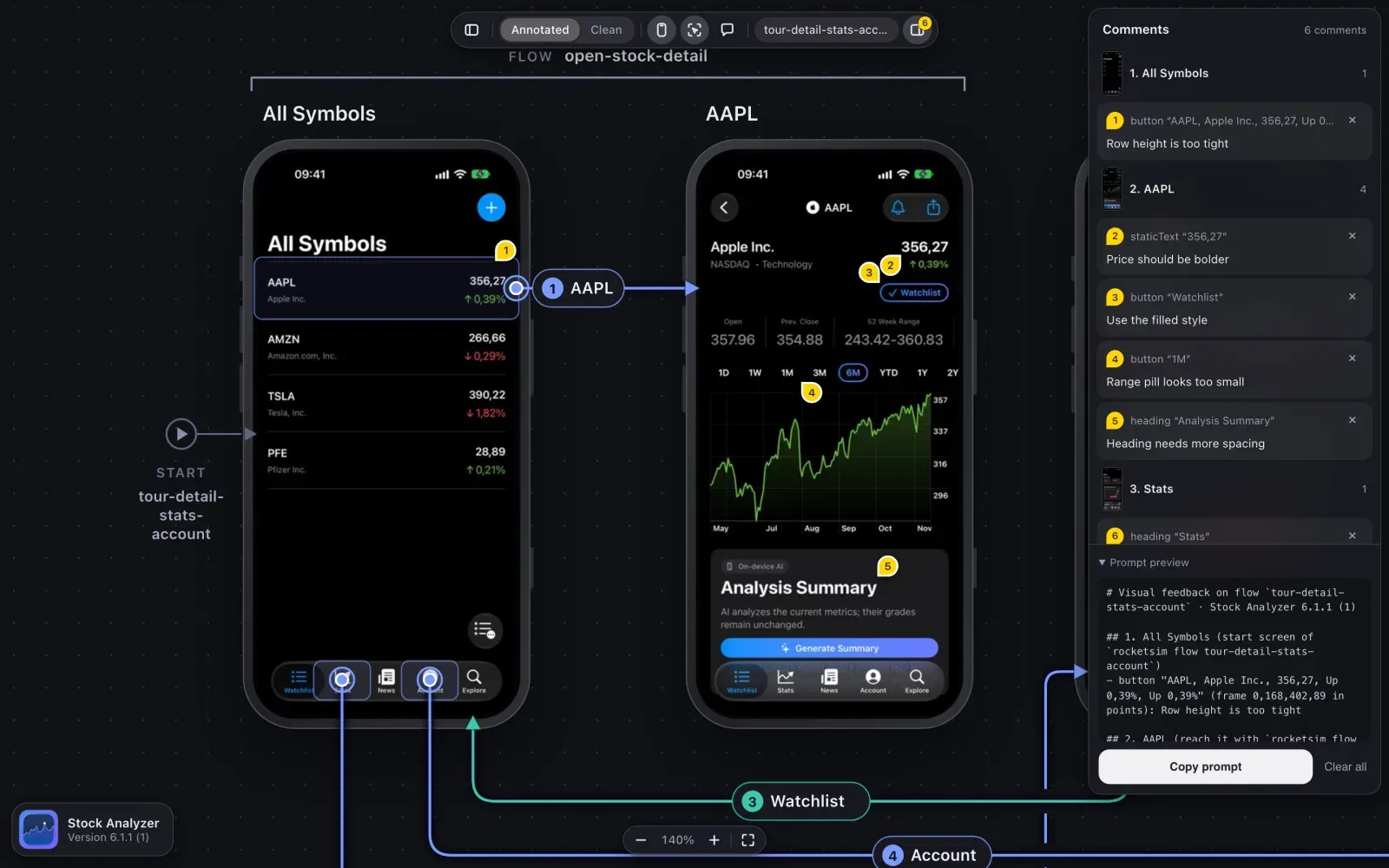
Point at it. Prompt with it.
Hover an element to read its label and identifier. Press C, click what looks wrong, and write a note. Copy prompt turns every note into one message for your agent. When an agent is watching, skip the copying: each note moves from Queued to Done as it works.
- C
- Comment on an element
- F
- Fit the board
- + / −
- Zoom in and out
- Arrows
- Pan
- Esc
- Clear the selection

With RocketTrace
Same path. Before and after.
RocketTrace records and analyzes Instruments traces and ranks what to investigate first. Its CLI returns a brief of the findings with evidence, so an agent can fix what the trace proves.
A saved flow makes the recording repeatable. Replay it after the fix, and compare the new trace with the old one on the same path.
- 1
RocketTrace · Start recording a trace of the build
rockettrace record start <build-id> --label "Checkout" - 2
RocketSim · Replay the saved path, the same way every time
rocketsim flow checkout - 3
RocketTrace · Stop, and wait for the analysis
rockettrace record stop --wait - 4
RocketTrace · Read the ranked findings in a few lines
rockettrace results get <result-id> --brief --format compact
Local
Yours, on your Mac.
-
Stays on your Mac
Flows are text files in RocketSim's Application Support folder. Nothing is uploaded.
-
Secrets never saved
A secret parameter reads from an environment variable at run time, and never lands in a file, log, or reply.
-
Kept small on purpose
About 15 steps per flow works best. Chain flows with prerequisites instead of writing one long path.
Questions about flows.
Short answers about saving, replaying, and healing Simulator paths.
What are RocketSim Flows?
Flows are saved iOS Simulator navigation paths. After your agent reaches a screen once, RocketSim saves the steps as a short text file. Next time, the agent replays the whole path with one command, such as rocketsim flow open-settings, instead of reading the screen and tapping step by step. See the Navigation Flows docs.
Which AI coding agents can use Flows?
Any agent that can run shell commands, including Cursor, Codex, Claude Code, and Xcode's agent. Flows use the same RocketSim CLI and Agent Skill as the rest of RocketSim's agentic development features. The flow review page opens in the IDE's own browser where the IDE has one.
Why do flows save tokens?
A replayed flow replaces many read, tap, and verify turns with one command and one short reply. The agent only reads the screen when it needs to decide something new. A failed run also returns one compact reply that names the step, the reason, and the nearest matching element, so the agent does not have to explore to recover.
What happens when my app's UI changes?
The flow stops at the step that no longer matches and reports it with the closest elements on the current screen. Your agent finishes the step by hand, then runs rocketsim flow fix to rewrite the step in the saved file. rocketsim flow verify replays flows before a task starts, to catch drift early.
How do flows handle logins and secrets?
A flow can declare parameters, and mark one as secret. A secret's value comes from an environment variable at run time and is never written to the flow file, a log, or a failure reply. A flow can also name another flow as a prerequisite, such as a login, and RocketSim skips it when its final check already holds.
Where are flows stored, and can my team share them?
Flows are plain-text .rsflow files in RocketSim's Application Support folder on your Mac, grouped by app. To share them with your team, keep the files in your repository and load them with rocketsim flow sync --dir <folder>, which saves only the flows that changed.
Can I give feedback on a flow and let my agent apply it?
Yes. Open the flow review page, press C, and comment on any element. When an agent is watching the flow, each comment moves from Queued through Implementing to Done as the agent works, and the agent can ask you a question right in the comment. No copying between the page and your agent. Without a watching agent, Copy prompt turns your comments into one message.
Can I share a flow with a reviewer and collect their comments?
Yes. When you turn on online sharing, which is off by default, RocketSim publishes a read-only copy of a flow at flows.rocketsim.app. Reviewers confirm their email and comment on screens, you approve their comments, and your agent applies the approved ones with rocketsim flow share-feedback. Agents cannot publish or approve comments. See Share a flow online.
Can I compare a flow in dark mode or a larger text size?
Yes. Add a variant line to a flow, such as variant: appearance = light, dark, and run rocketsim flow <name> --all-variants. RocketSim runs the flow in each combination of appearance, text size, and orientation, then puts your Simulator back. The review page has a Variant menu to switch between the runs.
Can I turn a flow into a demo video?
Yes. rocketsim video record --flow <name> --touches --zoom records the flow at a watchable pace with a gliding pointer, and zooms into each tapped element. Record it again whenever your app changes to get an up-to-date video.
Do flows work with RocketTrace?
Yes. Start a RocketTrace recording, replay a flow with RocketSim, stop the recording, and read the ranked findings. Because the flow takes the same path every time, a trace before and after a fix compares like for like.
Which RocketSim version includes Flows?
Flows ship with RocketSim 17. Install the CLI and Agent Skill from Settings → CLI & Agent.
Walk it once.
Replay it forever.
No signup. Works with Xcode 16+ and Xcode 27's Device Hub.