Networking

Inspect requests, export AI-ready debugging context, and control Simulator network conditions

Network Monitor

Inspect, summarize, and debug network traffic in realtime

Explore JSON responses, request headers, metrics, and connected app logs without setting up a proxy. Copy cURL requests, export privacy-redacted summaries, and generate prompt-ready debugging context for AI-assisted network reviews.
Learn more · Watch demo

Network Monitoring is made possible by Pulse, an open-source project created by Alex Grebenyuk.

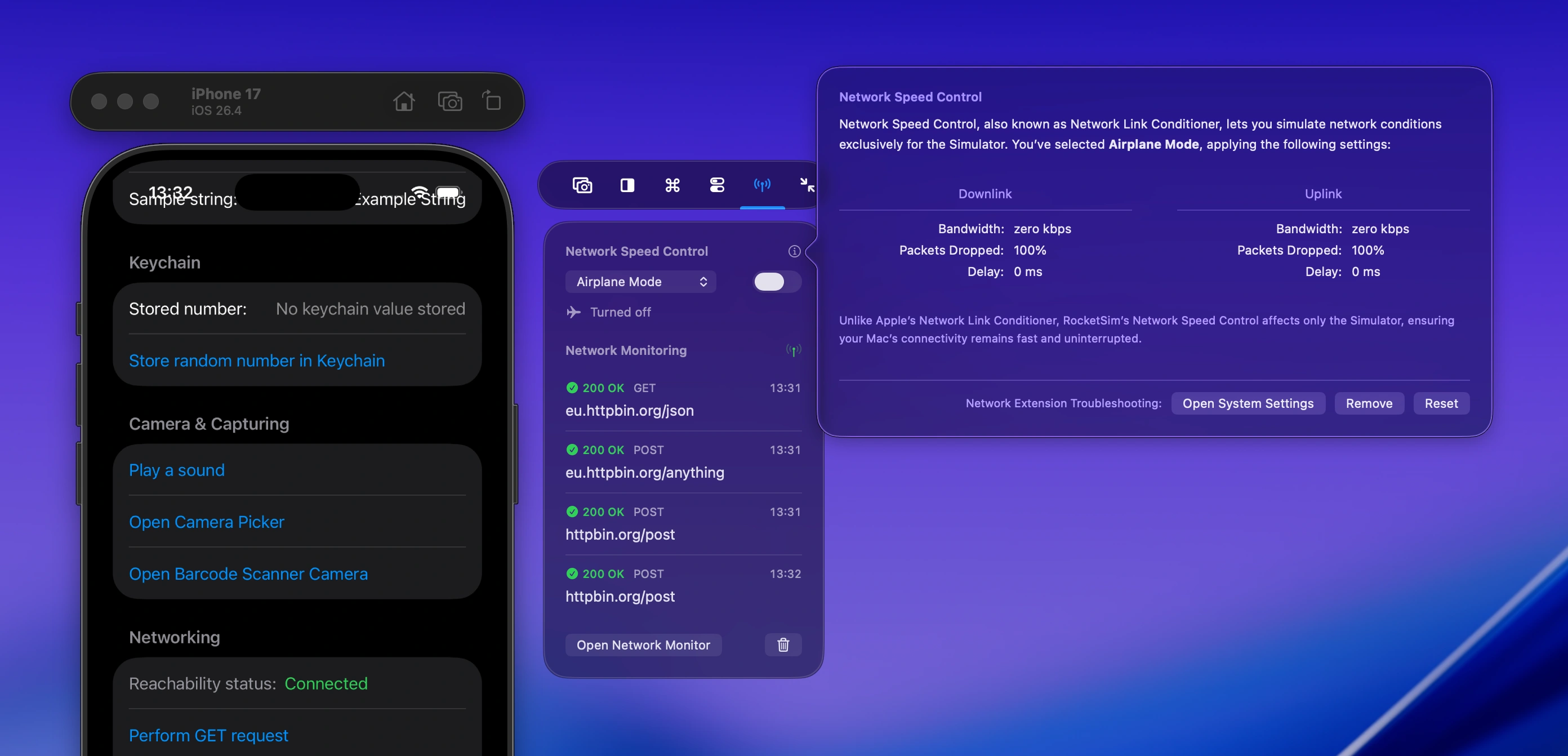
Network Speed Control

Simulate slow networking conditions like 3G, Edge, and 100% loss without affecting your Mac’s connectivity.

Watch demo

RocketSim panel that shows a dropdown for network speed control. A popup is shown that gives more information about the network speed control feature.

Simulator Airplane Mode

How does your app work without a connection? Only your Simulator app gets disconnected. You can still use your Mac’s connection to search Stack Overflow, use ChatGPT, or share your progress via Slack.

Network AI Prompts

Export network requests as privacy-redacted prompts you can paste straight into ChatGPT, Claude, or any other AI assistant.

Learn more

Exported network request prompt showing redacted request and response data, ready to paste into an AI assistant.

Ready to Build Apps Faster?

Boost your productivity and streamline your workflow with our powerful Xcode Simulator tools. Developers report building, testing, and verifying apps up to 2x faster with RocketSim.